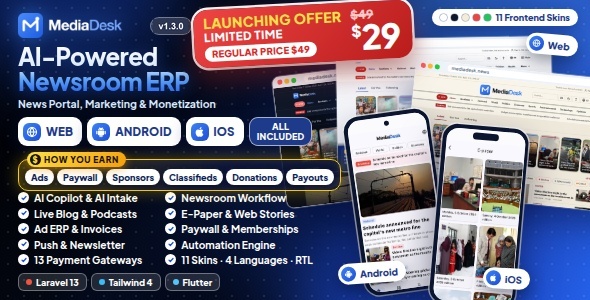
MediaDesk | Newsroom ERP with Flutter Mobile App
MediaDesk is a complete news website and newsroom management platform: a fast public
reader site, a newsroom ERP where editors plan, write, review and publish, AI Studio writing tools, marketing and automation tools,
a monetization suite (advertising, membership, classifieds, donations) with finance reporting, and a
Flutter mobile app for Android and iOS. It ships as a Web + Mobile App package: a Laravel 13
backend with 51 REST API endpoints that the app and the web both use.
Run a daily newspaper, a magazine, a local news site, a TV or radio portal, or a digital-only newsroom from one install.
It is multilingual by design: four built-in languages (Bangla, English, Arabic with right-to-left layout, French),
per-language articles, URLs, SEO tags and hreflang, an editable phrase editor, and the option to add more languages from the admin.
Eleven reader skins, light and dark mode, e-paper, live blogs, podcasts, shorts and web stories are included.
AI Disclosure
- AI features in the product: AI Studio (rewrite, shorten, expand, translate, summarize, headline, SEO and tag suggestions) and AI intake (URL, text or PDF to draft) send the text an editor selects to the AI provider the buyer configures: Anthropic Claude, Google Gemini or an OpenAI-compatible API. They are optional and stay off until you add your own API key; the provider’s usage charges are paid by you and are not included in the item price. AI output is a draft: an editor reviews it before anything is published, and AI drafts never publish themselves.
- AI used to create this item: AI tools (Anthropic’s Claude) assisted with writing and reviewing parts of the source code (Laravel and Flutter), the documentation and README files, and the scripts that render the listing graphics. The listing graphics are HTML/SVG layouts and screenshots of the real application; no AI image generation was used. All code and content were reviewed and tested by the author, and the item ships with its automated test suites.
Live Demo
Demo Instructions
The admin and advertiser login pages also have one-click Demo access buttons that sign you in with these accounts. The demo admin accounts are read-only: you can open every screen, but saving, deleting and uploading are disabled, and API keys are masked.
Admin Panel
Newsroom ERP, CMS, AI Studio, ads, membership, finance, marketing, automation and settings. Sign in as Super Admin to see every module, or as a role account to see what that role can access.
Reader Site
URL: mediadesk.bugbuild.com
The premium subscriber account opens paywalled stories and the membership screens. You can also register a new free reader account.
Advertiser Portal
The portal shows the advertiser’s campaigns, invoices and payments.
Mobile App
Android demo app: Download the demo APK
The app connects to the live demo. Sign in with the premium subscriber account above.
Documentation
URL: mediadeskdocs.bugbuild.com
The demo resets periodically. The weather, stock market, prayer-time and advertiser figures on the demo are sample data.
These demo accounts exist only on the demo server: a fresh installation creates only the administrator you enter in the installer.
What You Get
New in Version 1.3.0
- Newsletter schedules — choose the days and times each list goes out, with a delivery report, sending speed and Retry failed.
- Flutterwave — cards, bank transfer and mobile money across Africa for memberships, articles, classifieds, donations and ad invoices.
- App download card with APK — Google Play link, a direct Android APK download, or both, plus the App Store link.
- Clearer settings — Public site settings split into sub pages that say what they hold.
- Reactions you choose — pick the reactions readers see, their order and the quick reaction.
- Easier comments — signed-in readers comment under their account name, on the website and in the app.
- Shorts with sound — videos play with sound by default, with a normal text size.
- Classifieds images and home block, video ad creatives, 200 MB default video uploads and many fixes (see the changelog).
New in Version 1.2.1
- Local time everywhere in Admin — every admin date and time field (stories, podcasts, live events, polls, classifieds, social posts, campaigns, desk deadlines, tasks and CSV imports) uses the site time zone, so scheduled items go live exactly when you set them.
- Searchable article picker for polls — attach a poll to an article by searching title, slug or ID.
- Clearer theme builder — empty fields keep the skin’s own look, and base spacing works in every density.
- One place for outgoing mail — mail is set up under Settings → Integrations → Email, and an existing setup is moved there automatically.
- Breaking alert setup checklist — shows what push needs before an alert can be sent.
- Safer bucket storage — optional bucket folder, clear provider error messages, and older files keep working after you switch the storage disk.
- Fixes — installer database check, PHP 8.4 warnings, theme corner radius, newsletter popup and language deletion (see the changelog).
New in Version 1.2.0
- Article editor safety — private autosave drafts with restore, who-is-editing locks with takeover, and protection against overwriting a colleague’s newer changes.
- Renewal reminders — e-mail and app push before a membership renews or ends, in the reader’s language, with the days set in Admin.
- Reader privacy tools — readers download their data and delete their account from the website, with a web link for app store listings.
- Professional system updates — official ZIP upload and FTP/cPanel updates finished from the admin panel, with SHA-256 validation for ZIP packages, protected paths, maintenance mode, backups and rollback.
- Database and permission quick-sync — shows the installed/new version and pending database updates, then runs migrations, role/permission sync, cache clearing and queue restart.
- Automated backup and restore — scheduled and on-demand local database backups, retention, download/restore/delete and optional automatic Google Drive copies.
- Secure Google Drive setup — configure everything in Admin; Client Secret and Refresh Token are encrypted in the database and no backup credentials are stored in
.env.
- Remote mobile operations — app maintenance, latest/minimum versions, optional or mandatory update policy, store links and sanitized app error reporting.
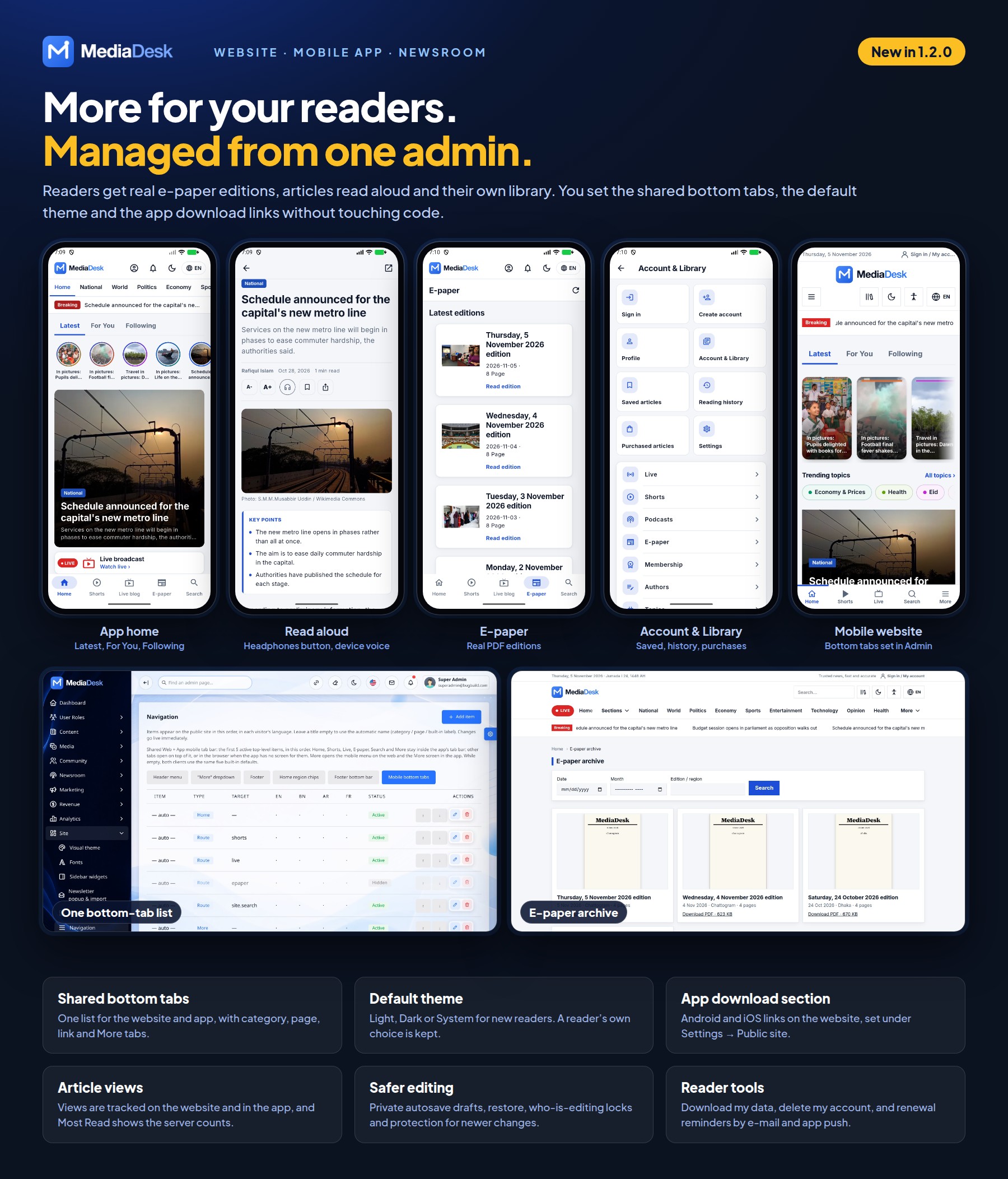
- Dynamic app navigation — manage the website and app bottom menu from one list in the web navigation manager, with Home, Shorts, Live, E-paper, Search, category, page, link and More tabs.
- Default theme — choose Light, Dark or System for new readers on the website and in the app.
- Better Shorts — improved autoplay on web and app, tap-to-pause/resume and accurate play/pause controls.
- Operations dashboard — backup status, failed queue job retry/removal and mobile crash/error review in one place.
- Modern date and time pickers — every admin date and time field now has quick choices, a relative time hint and clear timezone display, in light, dark and right-to-left layouts.
- Instant admin page search — find any admin page you can access from the header, with keyboard navigation.
- One-click Link storage and Clear cache — header actions for administrators, useful on hosting without terminal access.
- Safer article saving — a failed save rolls back media and translation changes, and the form takes you straight to the first field that needs attention.
- Real e-paper editions — readers open real PDF editions on the website and in the app, with protected PDF access and page previews.
- Read aloud and reader library — device-voice read aloud, following feeds, guest library, library backup and account security tools in the app.
- Article view tracking — views are tracked on the website and in the app, and Most Read shows the server counts.
- App download section — show Android and iOS links on the website, set under Settings → Public site.
New Professional System Update Feature
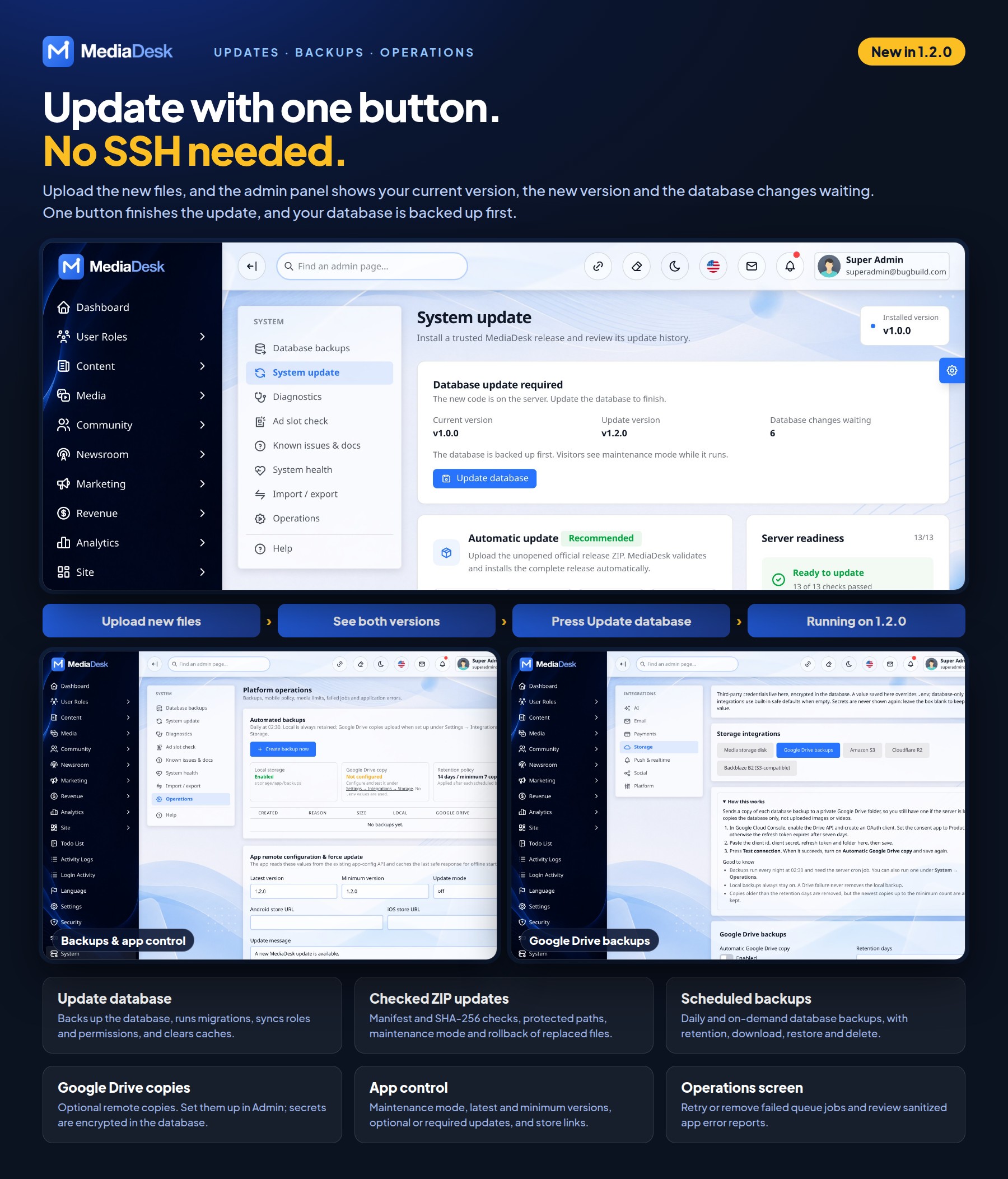
MediaDesk 1.2.0 introduces a complete System Update module for existing customers. Owners and Super Admins can see the installed version, available version and pending database changes, then update safely without manually running every maintenance command.
- ZIP update — upload an official MediaDesk update ZIP directly from System → System update; it is verified and installed for you.
- FTP/cPanel update — upload files through hosting tools, then press Update database. No SSH is needed.
- Update database — shows the current version, the update version and the changes waiting, then backs up the database, runs migrations, refreshes roles and permissions and clears caches.
- Safe package validation — verifies product, version, manifest, SHA-256 checksums, protected paths and archive contents before installation.
- Recovery protection — coordinates maintenance mode, creates private backups, keeps update history and rolls replaced files back when installation fails.
- Protected customer data — update packages cannot replace
.env, storage/, uploads, vendor/ or linked public storage.
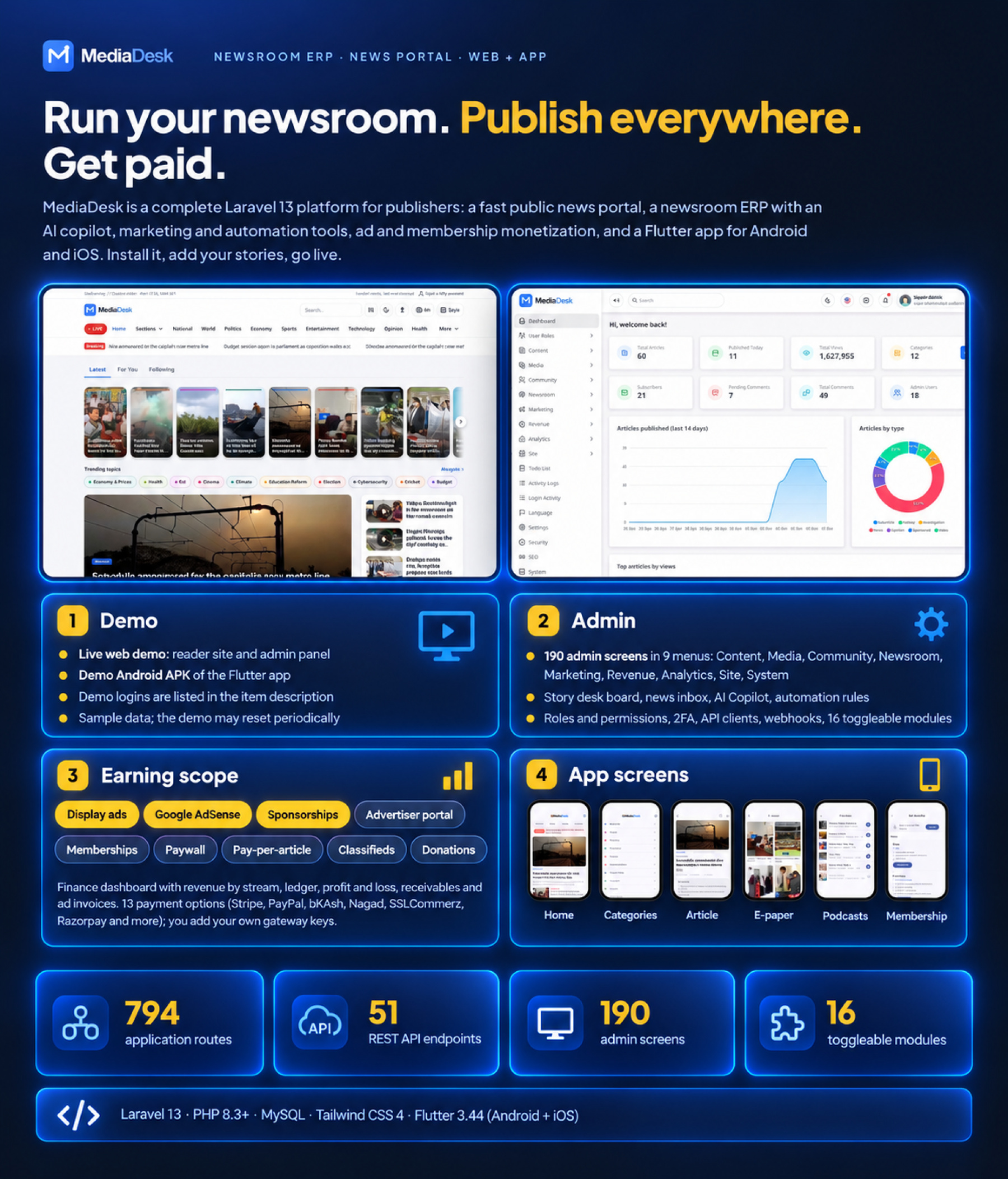
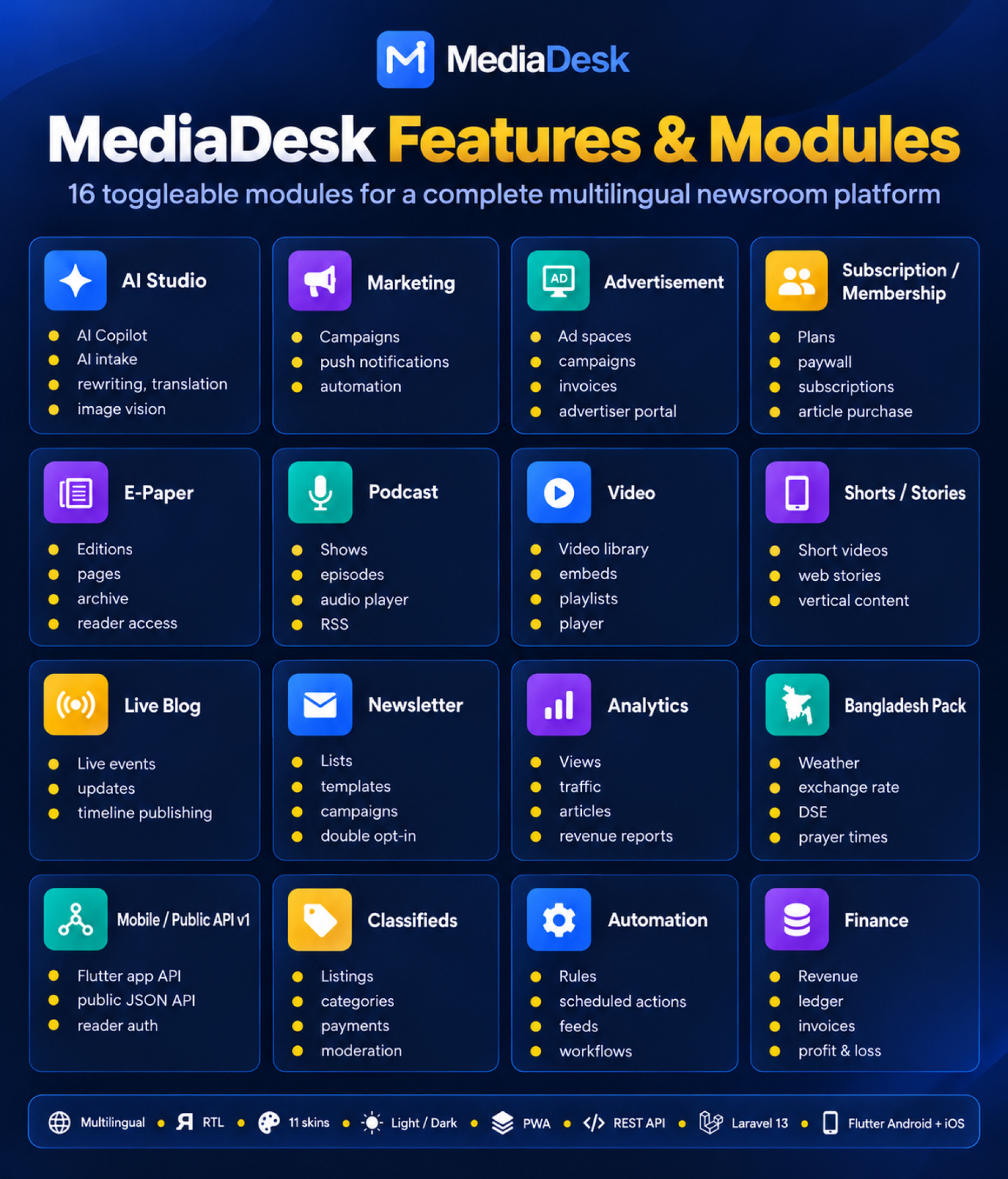
- Laravel Web Backend — reader site, newsroom ERP, admin panel with 190 screens, 813 routes and 16 toggleable modules.
- Mobile App (Flutter) — Android and iOS app for readers: home feed with breaking bar, categories, articles, search, e-paper, live blog, podcasts, membership plans, notification settings, saved articles, reading history and settings (4 languages, light/dark/system theme, text size).
- Both platforms are included — the Android and iOS projects of the one Flutter codebase are in the package.
- Full source code, database migrations, demo seeders and documentation, all in the main download as
Main_Files/WebSourceCode, Main_Files/AppSourceCode and documentation. Composer packages (vendor) and compiled build folders are not included: you install them once with composer install and npm ci && npm run build, as shown in the documentation.
- Plain, readable PHP and Dart — no encoded files and no licence server.
- Safe web installer — installs only into an empty database, never drops tables, and locks itself for good after the first run (
storage/installed), so it can never be reopened to overwrite your data or database settings.
- Easy to rebrand — the documentation lists where to change the app name, bundle identifier, icon, splash screen, colours and fonts; README files for both projects.
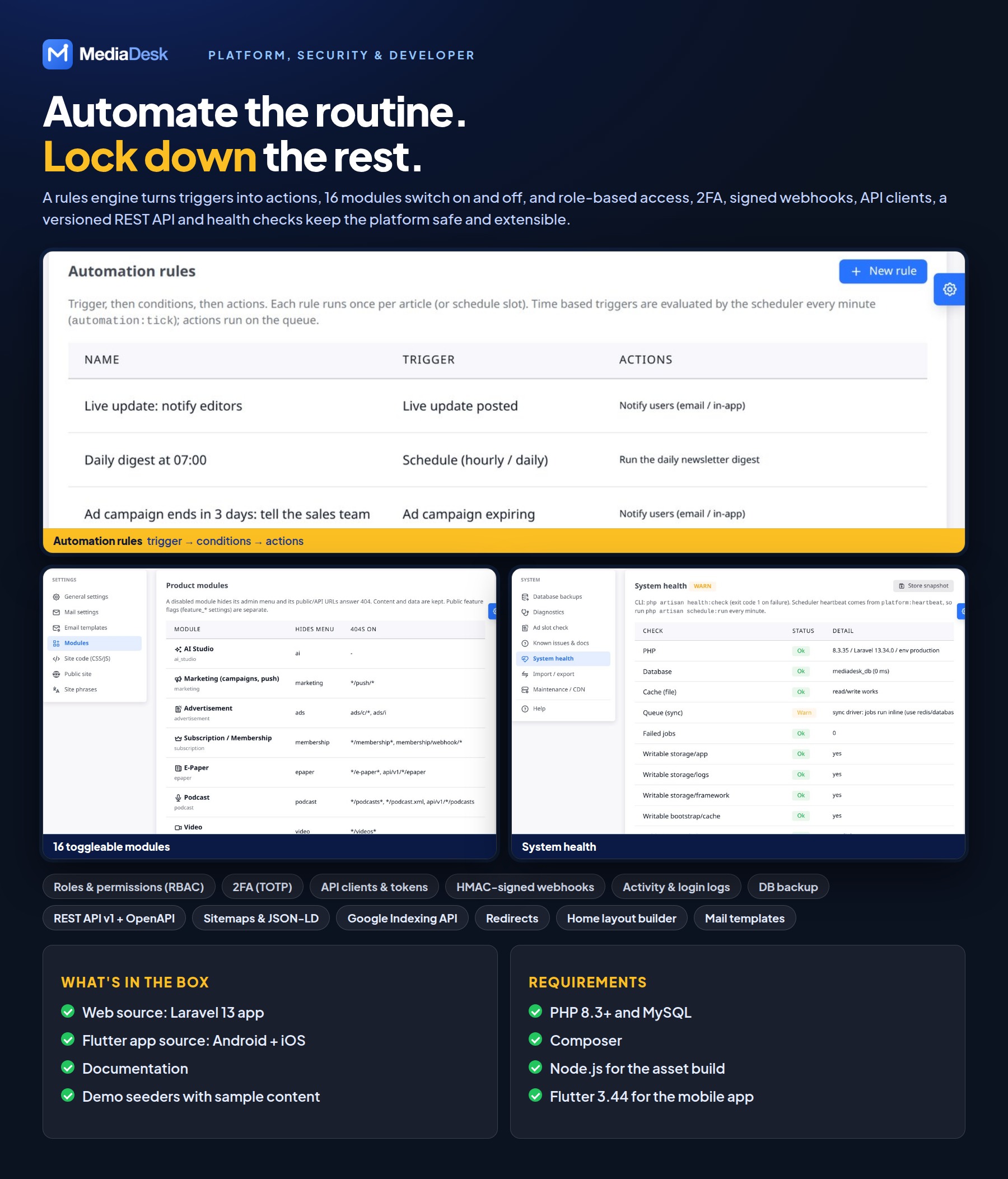
- Module manager — switch AI Studio, Marketing, Advertisement, Membership, E-Paper, Podcast, Video, Shorts/Stories, Live Blog, Newsletter, Analytics, Bangladesh Pack, Mobile API, Classifieds, Automation and Finance on or off.
Application Features
Public Reader Site
- 11 reader-selectable skins: Modern, Classic, Magazine, Night, Compact, Local, Alo, Times, Wire, Broadcast and Star, each with light and dark mode
- Four languages out of the box (bn, en, ar with RTL, fr); admins can add more languages and edit every phrase
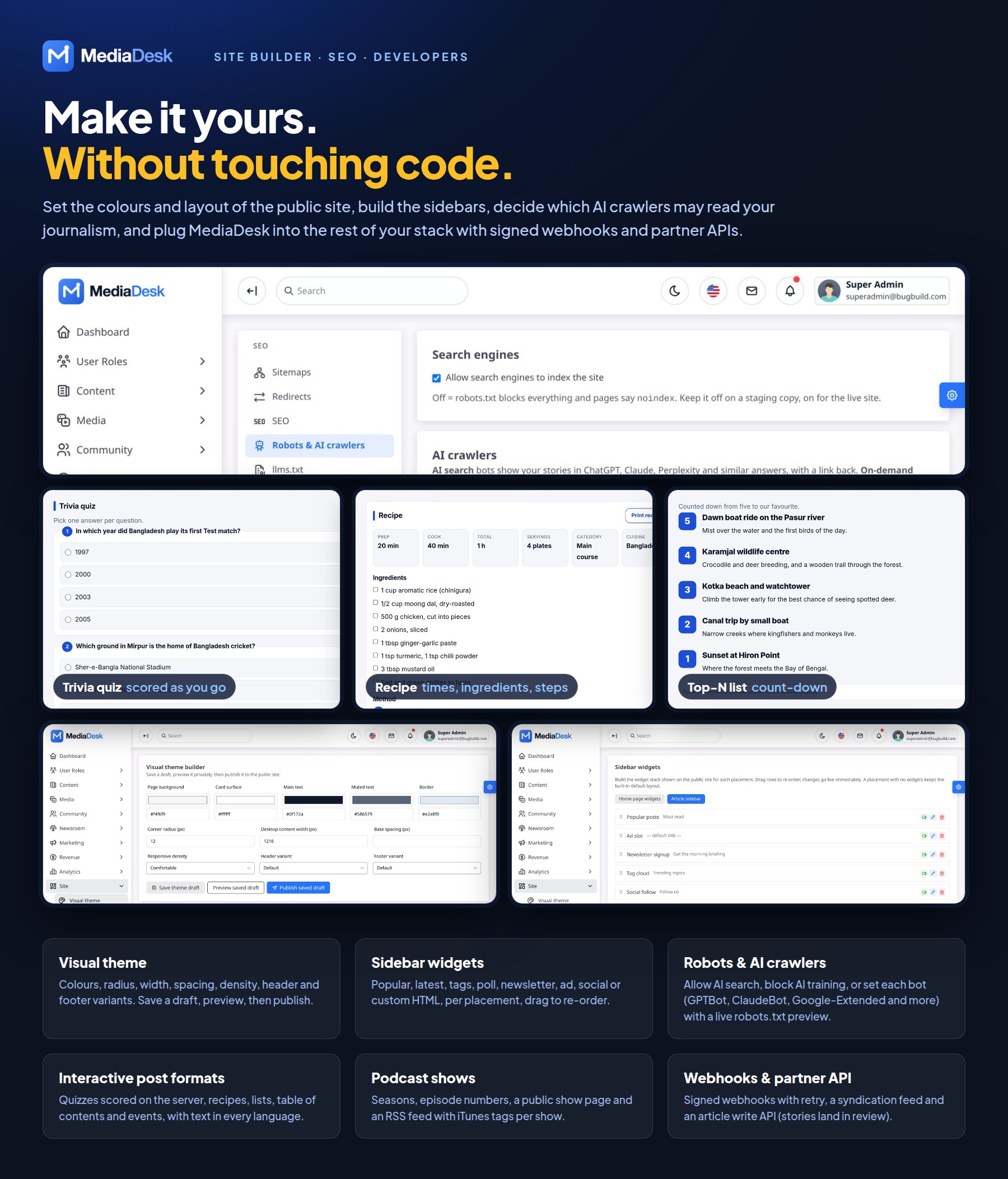
- Visual theme editor: set the site colours in the admin, preview them as a draft, then publish
- Installable PWA, bookmarks, reading history, follow topics and authors, For You and Following tabs
- Reader accounts with email sign-up or Google sign-in (your own Google OAuth keys); readers can download their data and delete their account
- Comments with reactions, polls (also placed inside articles), newsletter sign-up with double opt-in and an optional sign-up popup, cookie consent
- Interactive post formats: trivia and personality quizzes, recipes, sorted Top-N lists, table of contents, events and captioned galleries
- Sidebar widget builder for the home page and article sidebar: popular, latest, tags, poll, newsletter, ad, social and custom HTML widgets, drag to re-order
- Live blog, podcasts, e-paper (HTML reader plus real PDF editions), web stories, shorts and video
- Classifieds, donations and support, reader story submission, archive calendar, topics, author pages and search
- SEO: sitemaps, news sitemap, JSON-LD, RSS and llms.txt; robots.txt and AI-crawler rules edited from the admin
Newsroom ERP
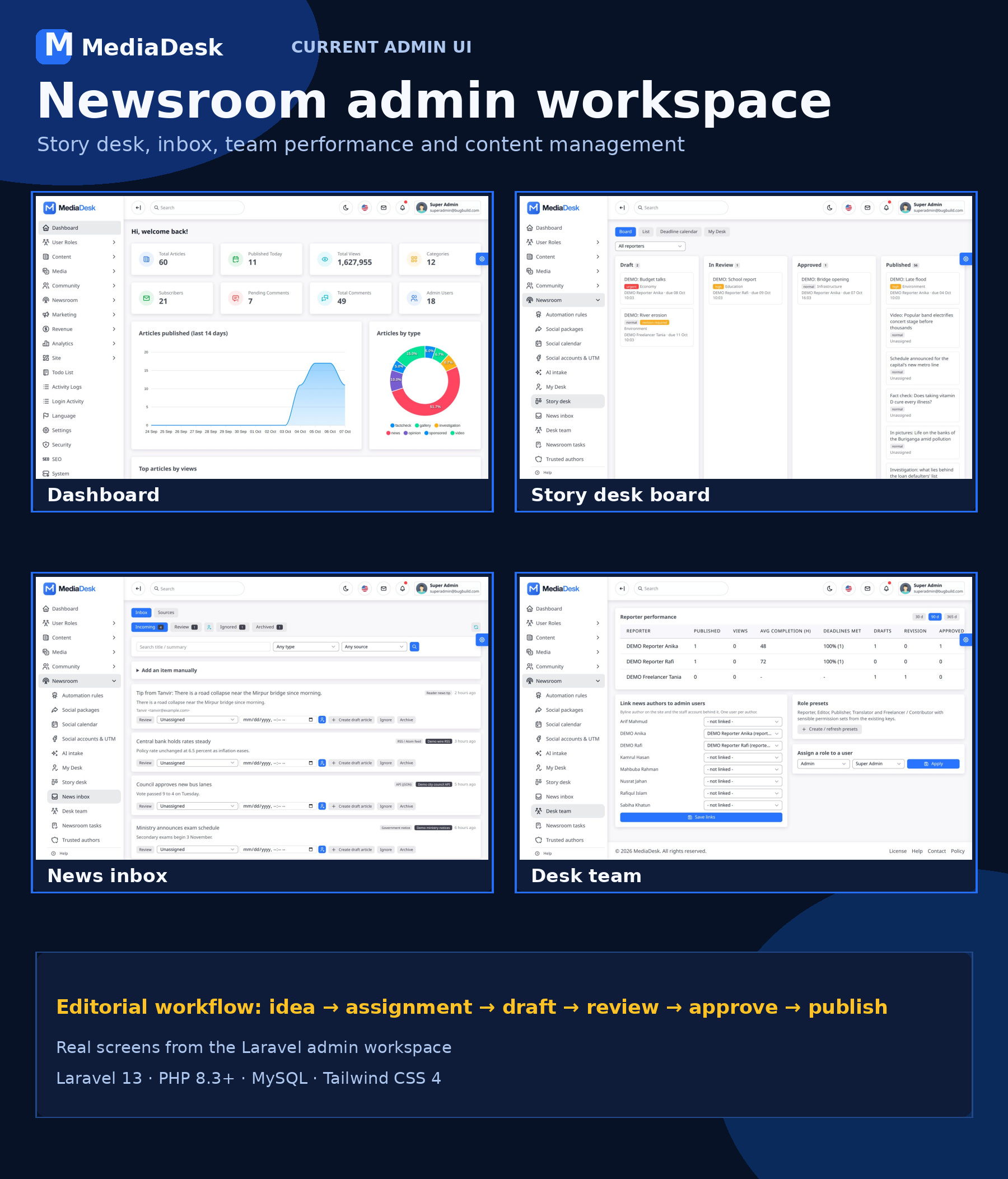
- Story desk board (Draft, In Review, Approved, Published), deadline calendar, My Desk, and desk team and performance views
- Article editor autosave to a private draft, who-is-editing locks with takeover, and protection against overwriting newer changes
- News inbox with RSS, API and press-release feeds; assign, convert to draft or ignore
- Newsroom tasks, trusted authors, revisions, fact-check and corrections
- Post format builders in the article editor (quiz questions and results, recipe, list, table of contents, event) with per-language text
- Rich article editor with per-language content, headings, lists, links, tables and inline images; unsafe HTML is sanitised automatically
- Media Library with reusable image, video, audio and document uploads; responsive image conversions, alt text, credit, licence and source fields
- Article cover image for hero, cards and social sharing preview (Open Graph / X); galleries, video poster, audio and attachments per story
- Article editor with categories, topics, workflow status, premium flag and geo-restriction (allow/deny by country, needs a CDN country header)
- Time-limited signed preview links for saved draft, in-review and scheduled stories, rendered in the real reader template and kept out of search engines
AI Studio
- Choose Anthropic Claude (default), Gemini or OpenAI; keys and token budgets are set in admin
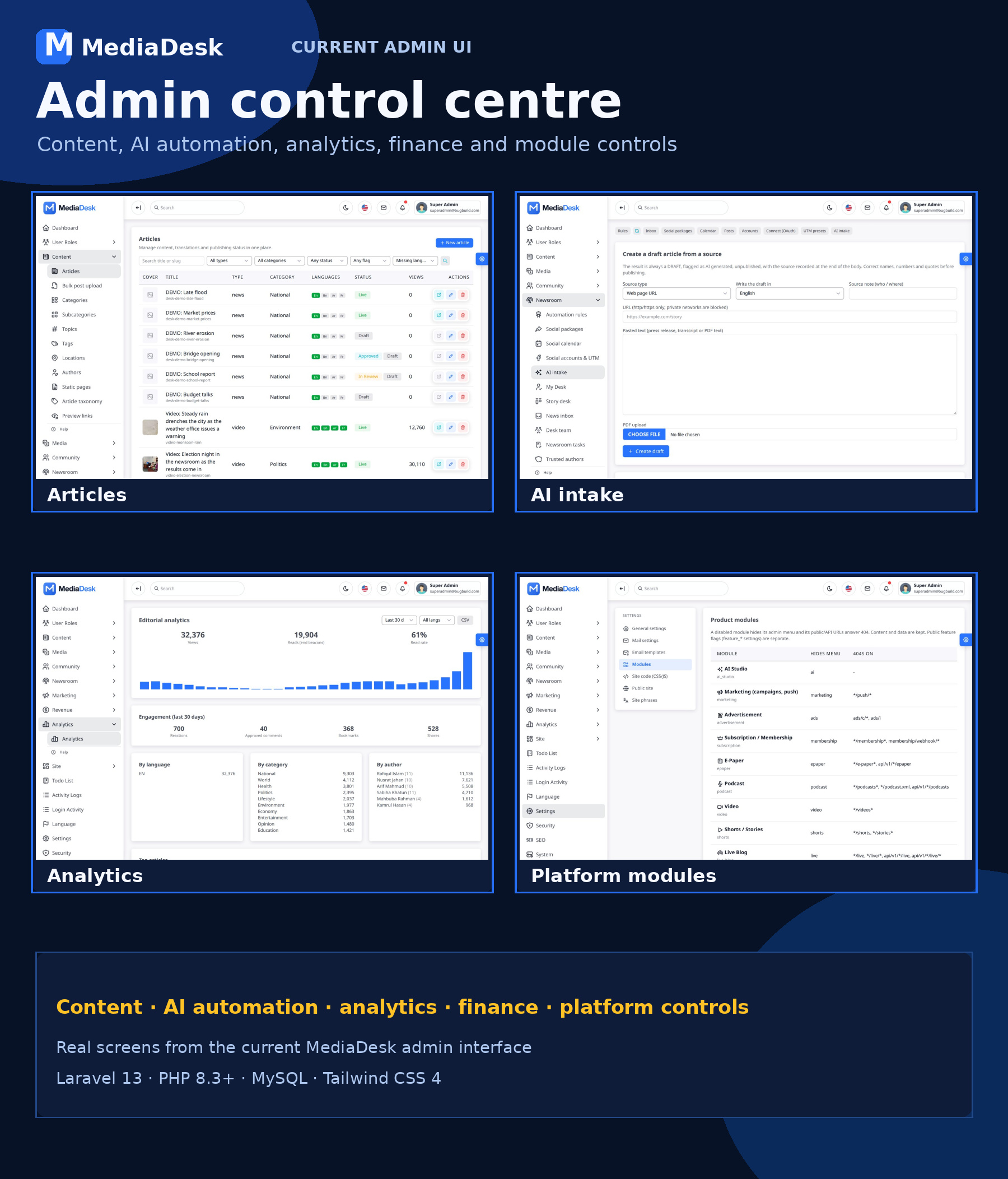
- Rewrite, shorten, expand, translate, summarize, headline, SEO and tag suggestions
- AI intake: turn a URL, pasted text or a PDF into a draft article
- Optional and off until you add your own provider key
See the AI Disclosure at the top of this page.
Automation and Social
- Rule engine: triggers such as article published, views threshold, ad campaign expiring or a schedule; actions such as social package, push, digest and notify; with a run log
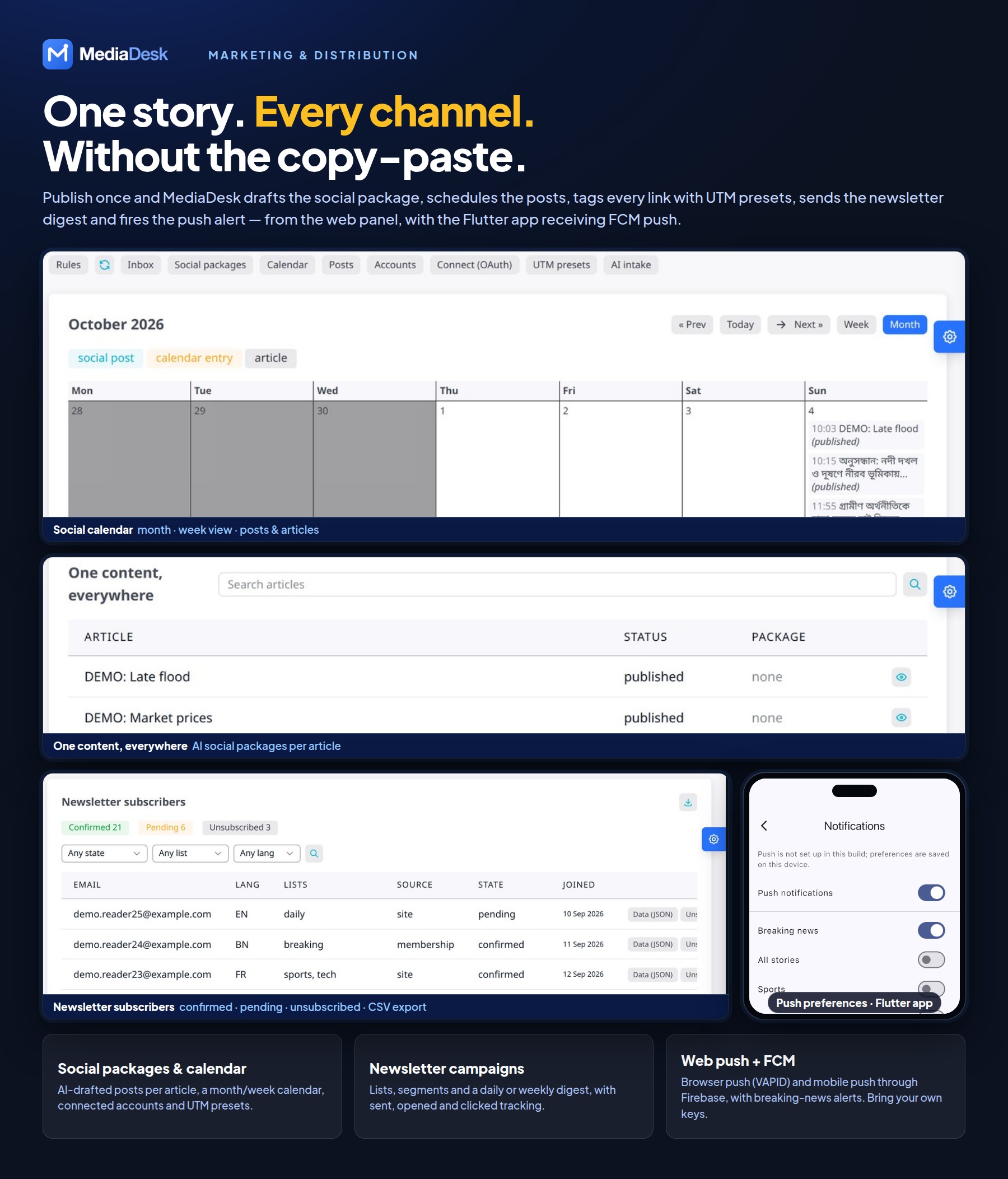
- One-content-everywhere social packages, social calendar, accounts and UTM presets
Marketing
- Newsletter campaigns, automatic digests on the days and times you choose, subscriber lists and segments
- Web push and FCM mobile push, push campaigns
Monetization
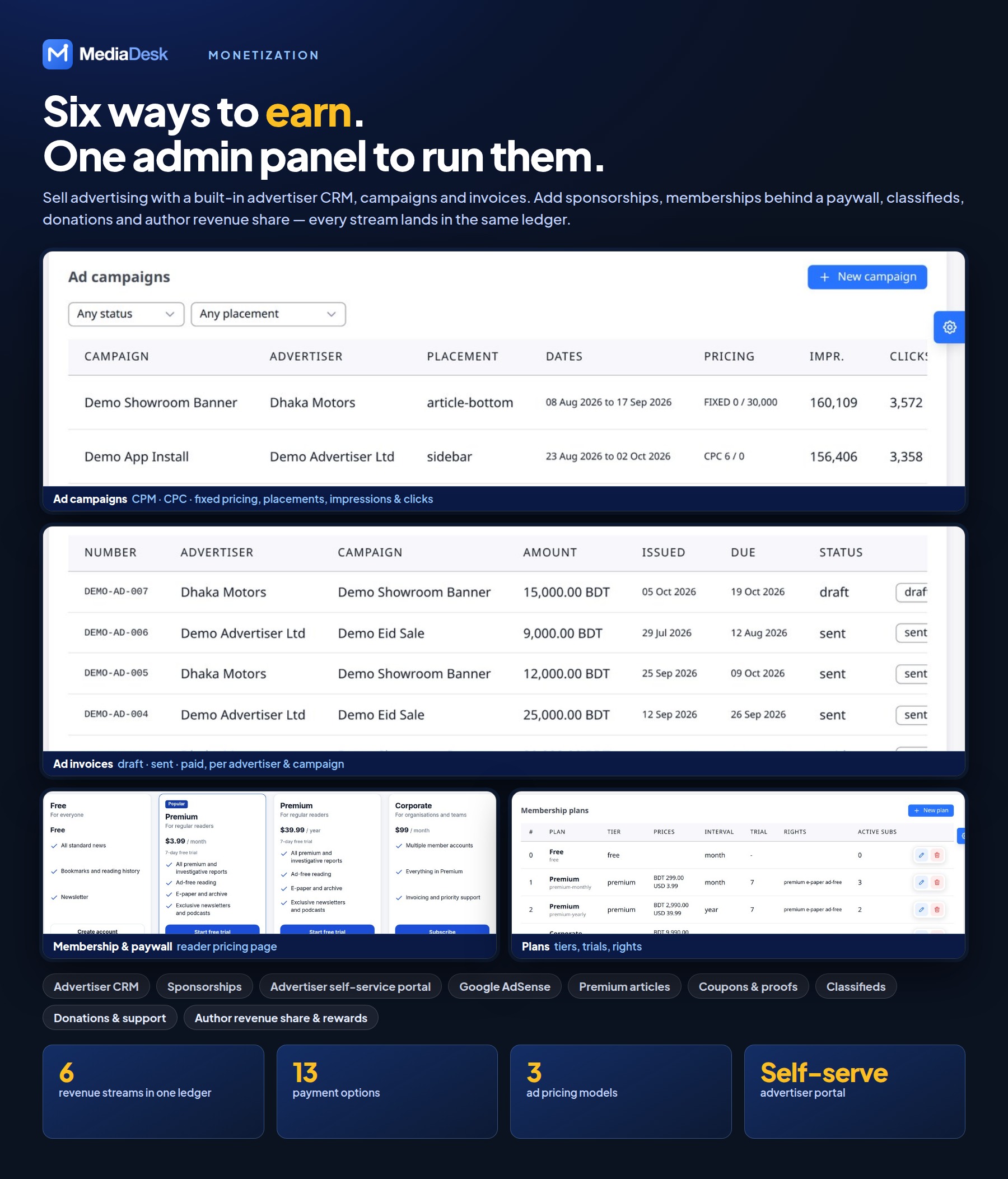
- Advertiser CRM, ad campaigns, placements, invoices, sponsorships, advertiser self-service portal and AdSense
- Membership plans, coupons and payment proofs, paywall and premium articles
- Renewal reminders by e-mail and app push before a membership renews or ends
- Classifieds, donations, author revenue share and rewards
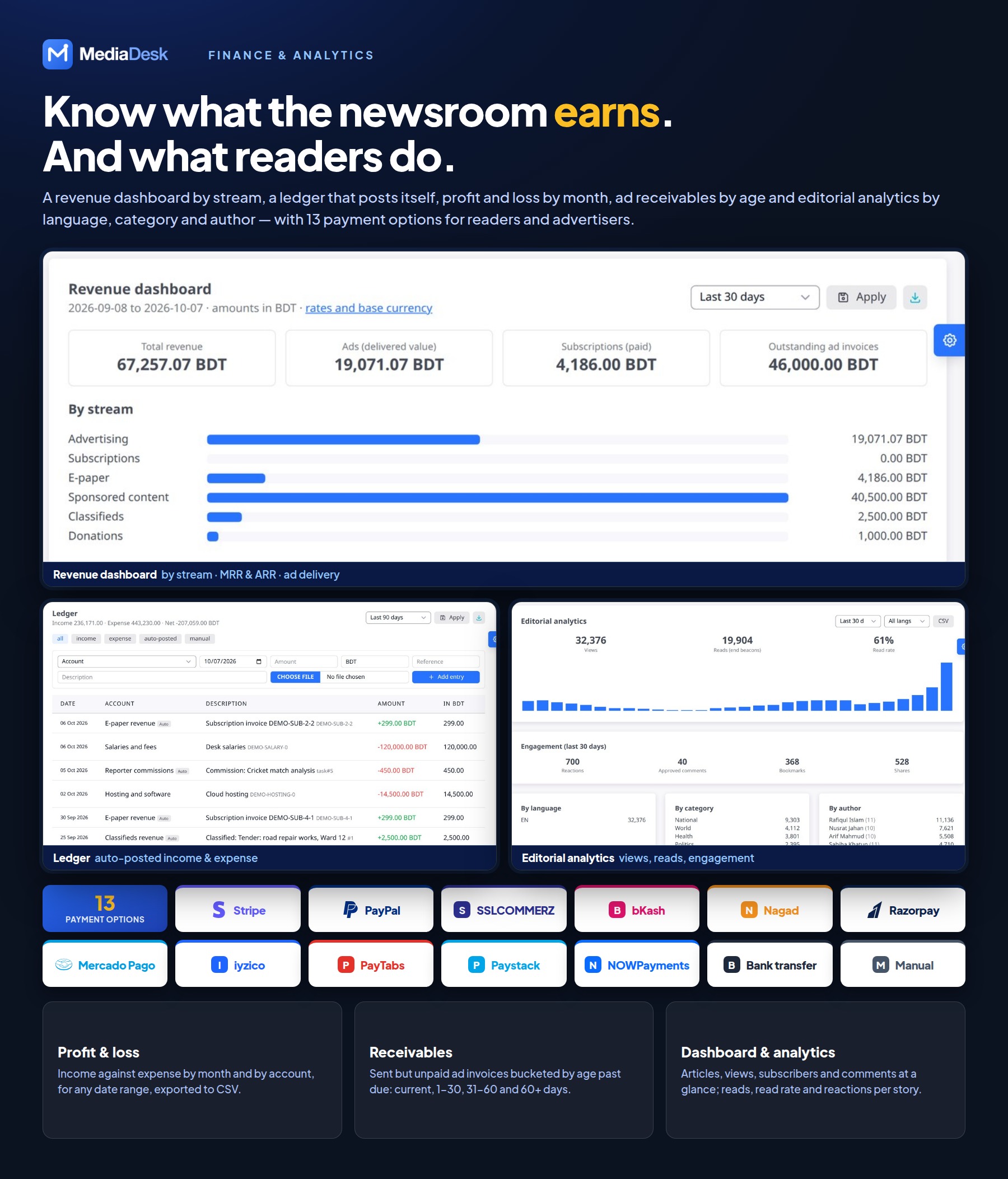
- 14 payment options: Stripe, PayPal, SSLCOMMERZ, bKash, Nagad, Razorpay, Mercado Pago, iyzico, PayTabs, Paystack, Flutterwave, NOWPayments (crypto), bank transfer (with proof upload) and manual
Payment services: Stripe, PayPal, SSLCOMMERZ and the other gateways are third-party services. Buyers must create and maintain their own merchant accounts, credentials, webhooks and compliance settings and are responsible for all transaction, currency-conversion and provider fees.
Finance
- Revenue dashboard by stream, ledger, profit and loss, receivables and ad invoices
Live, Audio and E-Paper
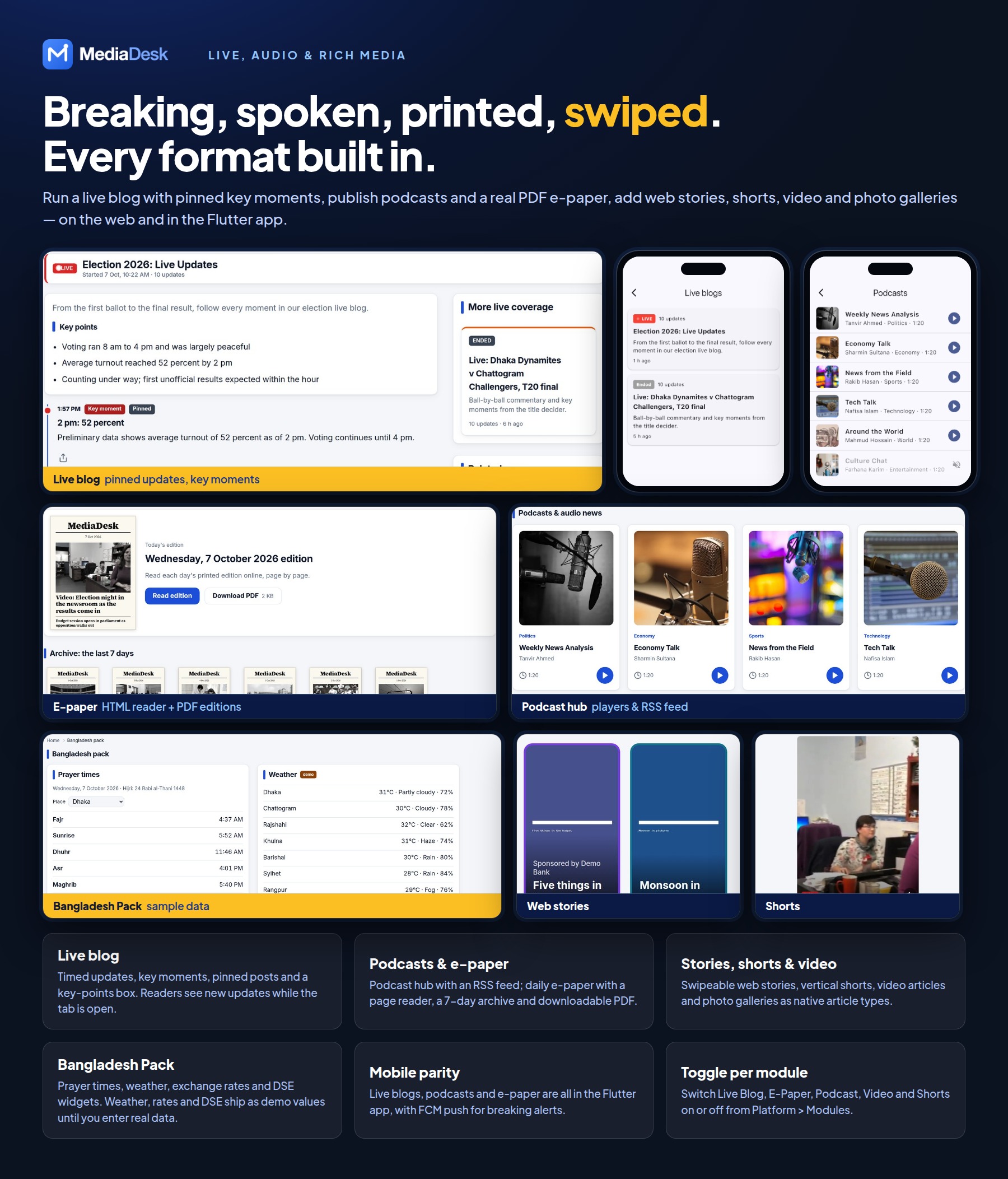
- Live blogs with key points, pinned and timed updates; breaking news bar
- Podcast episodes and podcast shows with seasons, episode numbers, per-show RSS feeds (iTunes tags), transcripts and members-only episodes with protected audio streaming
- Web story editor, shorts and breaking-news push alerts
- E-paper with daily editions, archive and PDF download (PDF generation needs headless Chrome on the server)
Flutter Mobile App (Android + iOS)
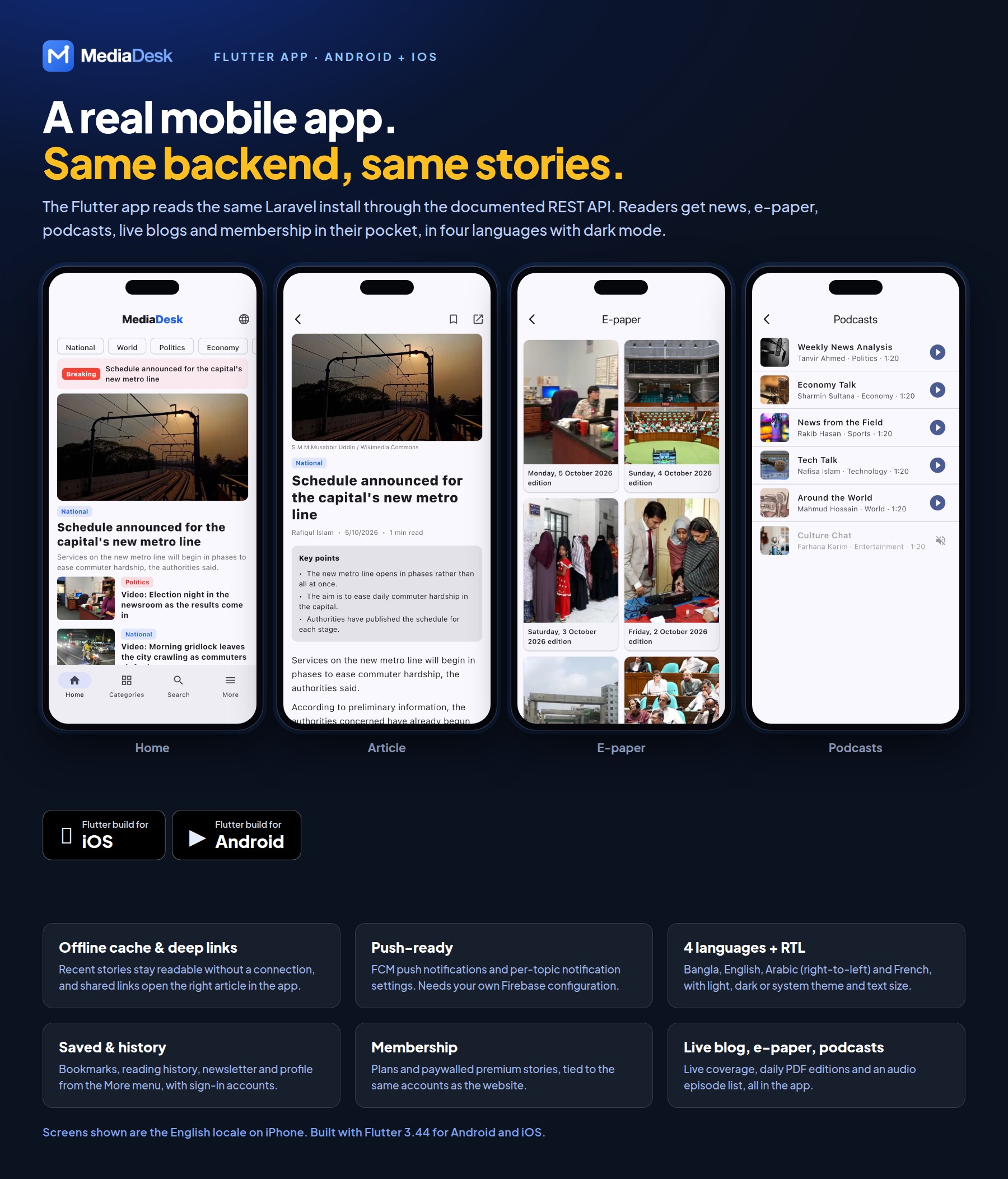
- Home with breaking bar, hero and latest; categories; article; search
- E-paper, live blog, podcasts, membership plans
- Sign-in and accounts, saved articles, reading history, newsletter, contact and about
- Notification settings, deep links and offline cache; 4 languages, light/dark/system theme, text size
- Web-managed bottom navigation, Shorts autoplay with tap-to-pause/resume, and server-managed optional/required app updates
- Membership plans and pay-per-post open your website checkout in the device’s external browser (no in-app purchase); a build switch hides the purchase buttons for stores or regions that do not allow external purchase links
- FCM push needs your own Firebase project and configuration (Firebase is a Google service with its own terms and possible usage charges)
Platform, Security and API
- Roles and permissions (RBAC), two-factor authentication, activity and login logs, system health, database backup
- REST API (api/v1, Sanctum) with 51 endpoints and an OpenAPI document; API clients and tokens
- Token-authenticated partner syndication feed and an article write API for pushing stories in from other systems
- Signed outgoing webhooks (HMAC-SHA256) for article, comment, subscriber, membership and invoice events, with retry and a delivery log
- WordPress import (WXR export file) for moving an existing site
- Redirects, SEO tools, home layout builder, navigation builder, visual theme, sidebar widgets, fonts, mail templates and phrase editor
- Demo mode for showcase sites, diagnostics page and a
mediadesk:doctor command
- Secure system updater with ZIP and FTP/cPanel updates, one-click database update, scheduled local/Google Drive backups, failed-job tools and app error reports
Bangladesh Pack
- Optional module with prayer times, weather, stock market (DSE) and currency widgets. The bundled values are demo data; connect your own sources for live figures.
Technologies Used
- Laravel 13 (PHP 8.3+), Blade, Tailwind CSS 4 and Vite
- MySQL 8.0 or newer
- Laravel Sanctum for API authentication
- Flutter 3.44 / Dart 3.12 (Android and iOS)
- Firebase Cloud Messaging for app push (your own project)
System Requirements
Web Backend
- PHP 8.3 or newer with gd (WebP support), intl, mbstring, pdo_mysql, exif, fileinfo and curl extensions
- MySQL database; Apache or Nginx with URL rewriting
- Composer 2 and Node.js 20+ to install dependencies and build the front-end assets once
- Writable
storage and bootstrap/cache directories
- Cron for the scheduler (
schedule:run) and a queue worker for automation, push and campaigns
- Optional: headless Chrome (photo cards, invoices, e-paper PDF) and poppler (
pdftoppm)
Mobile App
- Flutter 3.44 (stable) with Dart 3.12; Android Studio for Android, Xcode on macOS for iOS
- A Firebase project for push notifications
- Your own Apple developer team (none is set in the project) and your own app name, bundle identifier, icon and splash screen
- Apple Developer and/or Google Play Console accounts to publish
Important Notes About Third-Party Services
External costs and your own accounts: Stripe, PayPal and the other payment gateways, e-mail delivery services
(SMTP, Mailgun, Postmark, Amazon SES, Brevo), Firebase Cloud Messaging (FCM) push and AI providers used by MediaDesk are external third-party services. To use them you must set up your own merchant and service
accounts (for example a Stripe or PayPal merchant account and a Firebase project). These providers may charge their own fees,
such as transaction, subscription or usage charges, which are not included in the item price.
Hosting, domains, email/SMTP, Firebase, Apple/Google developer accounts, AI provider usage, payment gateway accounts and
fees, and any other third-party service are not included in the item price. You supply your own API keys and credentials.
Payment gateways, AI providers, web push, FCM and social publishing were verified during development with simulated
(faked) HTTP responses; test each integration with your own sandbox credentials before going live.
Sample photos, video clips and audio on the live demo are Creative Commons works from Wikimedia Commons. They are
not included in the download; the optional demo data uses generated placeholder thumbnails instead. Fonts and
Composer/Flutter packages remain under their own licences (see the documentation for credits).
Documentation
Installation, configuration and app build guides: View Documentation.
The same files are in the documentation folder inside the download.
Changelog
Version 1.3.0 — 19 November 2026
- Added Marketing → Newsletter schedules: choose, for each newsletter list, the days and times (site time zone) the digest goes out automatically, several times a day if you like, with a minimum number of new stories, an on/off switch, a preview of the next issue and a test send. Each issue carries only the stories published since the previous one, and a send time missed by more than 2 hours (for example while the server was down) is skipped instead of sent late. The former fixed times (daily list at 07:00, weekly list on Fridays at 08:00) become the two default schedules.
- Newsletter delivery: set a Sending speed (mails per hour) under Marketing → Campaigns so campaigns, digests and retries stay within your mail host’s limit; a campaign page now lists why recipients failed and has a Retry failed button that never mails anyone twice; when the mail host refuses several messages in a row, sending pauses for 15 minutes instead of failing the whole list.
- Fixed temporary mail failures (the host’s hourly limit, connection or login problems) removing good subscribers from the list: only a bad address now counts, and the database update restores subscribers removed this way.
- Added Flutterwave as a payment gateway (cards, bank transfer and mobile money across Africa) for memberships, single articles, classifieds, donations and ad invoices, with refunds and a key check under Settings → Integrations.
- Fixed long article titles overlapping the other columns in Analytics → Top articles.
- Fixed approving a classified whose fee has not been paid showing a bare “422 Unprocessable Content” page: the list now shows Confirm payment for unpaid classifieds and explains what to do. Any admin action refused for a reason now returns to the page with that reason shown, instead of an error page.
- Fixed a long headline on the home page lead story covering the photo: it now shows at most three lines, and very long headlines use a smaller size without the summary.
- Added an optional image or logo to classifieds. Readers can attach a JPG, PNG or WebP when they submit; it stays private until an editor approves the classified, and editors can replace or remove it. Classifieds with an image show it in the list and on the detail page, the others keep the text layout. The mobile API returns the image URL.
- Added a Classifieds block to Site → Home layout: switch it on, place it anywhere on the home page, and choose all types or one (for example Jobs only) and how many to show. It lists approved classifieds in the reader’s language, featured first, with their image when they have one, and links to the classifieds page. It is hidden on existing sites until you switch it on, and approving or editing a classified now refreshes the cached pages at once.
- Settings → Public site is split into sub pages listed under it in the Settings panel: General, Prayer times, Site texts, Contact & social, Branding (colour & logo), Site shell & footer, App download (Android, iOS), Ads & analytics, Ad rates & audience, Membership, Comments, Newsletter & contact lists, Features, Reactions and Post formats. Switching between them keeps unsaved changes, Save still saves them all, and a field with an error opens its sub page.
- The admin Revenue menu is split into three menus: Advertising (advertisers, campaigns, sponsorships, ad invoices, advertiser portal), Memberships (plans, coupons, bank transfers, members) and Finance (revenue, receivables, ledger, profit and loss, accounts, classifieds, donations, currencies).
- Revenue dashboard: subscription income now counts as E-paper income only for e-paper-only plans, so premium plans that include the e-paper show under Subscriptions (existing ledger entries are moved automatically). Free trials are listed apart and no longer counted in MRR or paying subscribers, and unpaid subscription invoices moved to the Subscriptions panel.
- Fixed exchange rates saved after the fact: ledger entries posted while their currency had no rate (counted 1:1) are now converted when you save the rate. Changing the base currency now converts the rate table and every ledger entry to the new base; before, the old rates were kept as if they were in the new currency.
- Fixed the “Demo audio” note on podcast episodes showing on live sites with demo mode off, and an empty credit line on episodes without credit or licence.
- Fixed Send breaking alert showing a 500 error page when sending failed: the page now shows the reason.
- Subscribers: search by e-mail, and put chosen subscribers on a list in one step (the ticked ones, or everyone matching the filter), then send a campaign to that list only. Lists you create now appear in the subscriber filters.
- Ad creatives can be an mp4 or webm video with an optional poster image; it plays muted and looping in any ad slot.
- Added a delivery report to Marketing → Newsletter schedules: each schedule shows how many mails of the latest issue were sent, are still waiting and failed, and the Delivery report page lists recent issues with the same counts per language, the reasons mails failed, and a warning when mails are waiting but none was sent for 10 minutes (queue worker not running). Sent means handed to your mail server.
- Added a choice of reactions under Settings → Public site → Features: pick which reactions readers see on articles and in the app, their order, and the quick reaction a single tap gives. A reaction switched off keeps its counts, and they come back when it is switched on again.
- Newsletter sign-up now sends the same address at most one confirmation mail every 10 minutes and three in 24 hours, so the form cannot be used to flood someone’s inbox. The reader sees the same message either way.
- Fixed a reader’s reactions, likes, comment likes, bookmarks, reading history and reading progress staying in the browser after signing out, or showing for another account signed in on the same browser: each account now keeps its own, and guests keep theirs.
- Fixed the To-do list: adding or editing a task always failed with “Something went wrong”. The edit form now shows the task’s current status, the attached image downloads, every task is listed (not only the latest 10), and a wrong status or user shows as a form error.
- Comments: a signed-in reader is no longer asked for a name and e-mail. The comment is posted under the account’s name, on the website and in the app (“Commenting as …”).
- Shorts: videos now play with sound by default. If the browser blocks sound before the visitor has tapped the page, the video starts muted and the sound comes on with the first tap. The title and description use a normal, smaller text size on the website and in the app.
- Fixed the “Demo edition” note showing on e-paper pages with demo mode off.
- The default video upload limit is now 200 MB (System → Operations → Video max upload). Sites that saved their own value keep it. The server must allow the size too:
upload_max_filesize and post_max_size in PHP (256M) and client_max_body_size in nginx.
- Listen on article pages now uses a voice for the article’s language, reads long articles to the end, and tells the reader when the browser has no voice for that language (many desktop browsers have no Bangla voice; Microsoft Edge and Chrome on Android do). The app already uses the device voice.
- Settings → Public site is split into more sub pages so each one says what it holds (Branding, Site shell & footer, App download, Ad rates & audience, Comments, Newsletter & contact lists, Reactions, Post formats and more). The App download card can now offer an Android APK file for direct download next to (or instead of) the Google Play link: upload the
.apk under Settings → Public site → App download; the button shows the file size, and typing a store link or choosing a file switches the card on. The card’s default texts now follow the page language.
Version 1.2.1 — 11 November 2026
- Added a searchable article picker (title, slug or ID) to polls, replacing the Article ID text field.
- Admin date and time fields now follow the site time zone (Settings → Public site) for web stories, podcast episodes, live events, polls, classifieds, social posts, newsletter campaigns, desk deadlines, task due dates and CSV imports; admin lists show the same local time.
- Visual theme builder: empty fields are labelled Skin default, colour swatches no longer appear black, and Base spacing now applies in the Comfortable density too.
- Mail settings moved to Settings → Integrations → Email. The old Mail settings link opens there, and the database update moves an existing mail setup across without overriding one that already works.
- Breaking alerts now include a setup checklist and are refused with an explanation until push notifications are configured.
- Advertise page audience figures are now set under Settings → Public site, and the press release note can be switched off.
- Media storage buckets (Amazon S3, Cloudflare R2, Backblaze B2 and other S3-compatible services) gain an optional Folder, clearer Backblaze setup notes, and a Test connection that explains provider errors and refuses a folder already used by another application.
- Switching the media storage disk no longer breaks older files: each file loads from the disk it was saved on, and new storage credentials take effect without restarting the queue worker.
- Media library checkboxes are easier to see on photos and in dark mode, with the selected card highlighted.
- Fixed scheduled items, such as web stories, staying Scheduled for hours because the entered time was saved as UTC.
- Fixed the installer refusing an empty database because it counted the tables of every database on the server.
- Fixed PHP 8.4 deprecation warnings (implicitly nullable parameters) appearing on pages.
- Fixed every skin losing its rounded corners when the theme corner radius was left empty, and the app receiving radius 0 instead of the default.
- Fixed the newsletter popup never appearing again after a failed subscribe attempt.
- Fixed deleting a built-in language also deleting its translation files.
Version 1.2.0 — 3 November 2026
- Added ZIP and FTP/cPanel update workflows with checksums, backups, maintenance mode and rollback.
- Added current/new version status plus one-click database and permission updates.
- Added scheduled local database backups and optional Google Drive copies configured securely in Admin.
- Added remote app maintenance and optional/required force-update policies.
- Added dynamic app bottom navigation and improved Shorts playback on web and app.
- Added queue failure management and sanitized app crash/error reporting.
- Added an app download section to the website, with Android and iOS links set under Settings → Public site.
- Added real PDF editions to the e-paper on the website and in the app, with protected PDF access and page previews.
- Added article view tracking on the website and in the app, with Most Read showing the server counts.
- Added read aloud with the device voice, following feeds, guest library, library backup and account security tools to the app.
- Added modern date and time pickers to all admin date and time fields, with quick choices, relative time hints and timezone display.
- Added instant admin page search in the header, limited to pages the signed-in user can access, with keyboard navigation.
- Added Link storage and Clear cache actions to the admin header for administrators.
- Added global prayer time controls for the time source and default location.
- Added a copy link option to the public site’s share actions.
- Added article search by title, slug or ID, with a preview of the selected article, in article taxonomy and preview links.
- Added current media previews to the story slide and cover image pickers.
- Added reader self-service data download and account deletion on the website, including Google sign-in accounts.
- Added renewal reminders by e-mail and app push before a membership renews or ends.
- Added article editor autosave and restore, who-is-editing locks with takeover, and conflict protection.
- Improved article saving with rollback protection for media and translations, gallery image details and editing of cover image details without a new upload.
- Improved the article form so validation errors highlight and scroll to the first field that needs attention.
- Improved ad impression and click recording by saving counts directly to the database, so totals and budget limits stay accurate.
- Improved e-paper page image generation on restricted hosting, with an optional
PDFTOPPM_BINARY path; the PDF viewer remains available when page images cannot be generated.
- Improved the System Update screen with step-by-step guidance, and the installed version is now also recorded in the database.
- Improved admin repeater controls and the header layout on phones, tablets and small laptops.
- Fixed article publish and expiry times so they are saved correctly in the site timezone.
- Fixed cache clearing security: it now requires the settings permission and can no longer be triggered by opening a link.
- Fixed category/listing layout, pagination, playback indicators and authenticated-reader login redirects.
- Fixed saving of Bangla and Arabic text in key points, poll options, plan features, live key points and AI headlines.
- Fixed deleted accounts blocking a later Google sign-up, and deleted or banned readers staying signed in on other browsers.
Version 1.0.0
Initial release:
- Public reader site with 11 skins, visual theme editor, 4 languages, PWA, live blog, podcasts and podcast shows, e-paper, web stories and shorts
- Interactive post formats (quizzes, recipes, lists, table of contents, events) and a sidebar widget builder
- Newsroom ERP: story desk, inbox and feeds, tasks, revisions, fact-check and corrections
- AI Studio with Anthropic Claude, Gemini or OpenAI, plus AI intake
- Automation engine, social packages, newsletters and push campaigns
- Advertising, membership, classifieds, donations, finance reports and 13 payment options
- 51-endpoint REST API, partner syndication and article write API, and Flutter app for Android and iOS
- RBAC, two-factor authentication, signed webhooks, WordPress import, backups and a module manager